Finding the right Discord bio is harder than it sounds. You have 190 characters, a tiny profile card, and whatever you write needs to look good sandwiched between your avatar and your roles.
Instead of staring at a blank text box, start with a template. Every template below has been designed to fit within Discord's 190-character About Me limit and look clean when pasted into an actual profile.
Want to customize these live? Use our Discord Bio Templates tool to edit any template, preview it on a real profile card, and copy it in one click.
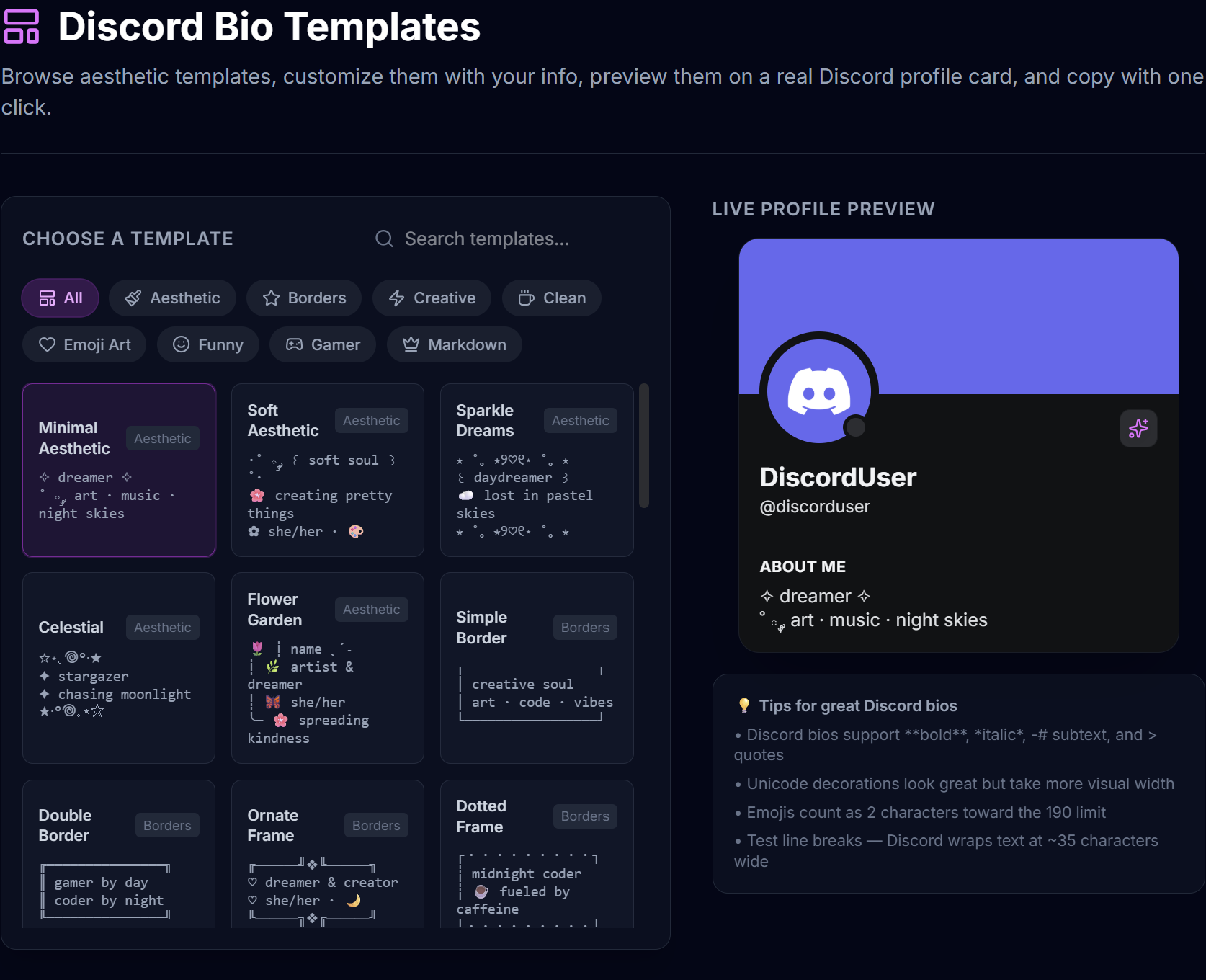
Aesthetic Bio Templates
These templates use Unicode symbols, soft characters, and minimal emoji to create a dreamy, polished look.
Minimal Aesthetic
✧ dreamer ✧
˚ ༘ art · music · night skies
Replace "dreamer" with your vibe word and list your interests after the dot separator. Short and clean — works for almost anyone.
Soft Aesthetic
·˚ ༘ ꒰ soft soul ꒱ ˚·
🌸 creating pretty things
✿ she/her · 🎨
The ꒰ ꒱ brackets frame your name or identity word nicely. Add your pronouns and a single emoji to close it out.
Sparkle Dreams
⋆ ˚。⋆୨♡୧⋆ ˚。⋆
꒰ daydreamer ꒱
☁️ lost in pastel skies
⋆ ˚。⋆୨♡୧⋆ ˚。⋆
The matching top and bottom borders create a symmetrical frame. Your text sits right in the center.
Celestial
☆⋆。𖦹°‧★
✦ stargazer
✦ chasing moonlight
★‧°𖦹。⋆☆
Compact and space-themed. The reversed star pattern on the last line mirrors the first line for a balanced look.
Flower Garden
🌷 ┊ name ˎˊ˗
┊ 🌿 artist & dreamer
┊ 🦋 she/her
╰─ 🌸 spreading kindness
Uses line-drawing characters with flower emoji to create a vertical layout. Each line has its own emoji accent.
Border Templates
Borders are one of the most popular ways to style a Discord bio. They frame your text and instantly make it look more intentional.
Simple Border
┌─────────────────┐
│ creative soul
│ art · code · vibes
└─────────────────┘
The classic box border. Clean, readable, works everywhere. Stick to 2-3 short lines inside to avoid hitting the character limit.
Double Border
╔═══════════════╗
║ gamer by day
║ coder by night
╚═══════════════╝
Double-line box characters give a stronger, bolder look. Good for gamers and tech people.
Ornate Frame
╔⏤⏤⏤╝❖╚⏤⏤⏤╗
♡ dreamer & creator
♡ she/her · 🌙
╚⏤⏤⏤╗❖╔⏤⏤⏤╝
A decorative frame with a diamond center piece. The alternating direction on top and bottom creates visual interest.
Dotted Frame
┌・・・・・・・・・┐
┊ midnight coder
┊ ☕ fueled by caffeine
└・・・・・・・・・┘
Softer than a solid border. The dots and ┊ characters give it a lighter, friendlier feel.
Vine Border
╭────┈ ↷
│ ✎ About Me
│ artist & dreamer
│ 🎨 creating daily
╰─────── ─ ─ ✦
An asymmetric design with a curved opening and a fade-out ending. Looks elegant and organized.
Creative Bio Templates
These templates go beyond simple text — they tell a story or create a visual concept.
Now Playing
🎧 Now Playing:
♫ Midnight City – M83
01:09 ━━━●───── 03:42
◁ ❚❚ ▷
One of the most popular Discord bio styles. Replace the song name and artist with whatever you're currently listening to. The progress bar made from Unicode characters really sells it.
Loading Bar
life progress:
▓▓▓▓▓▓░░░░░░ 50%

still loading...
Use ▓ for filled and ░ for empty sections. Adjust the ratio to match your vibe — 25%, 50%, 75%, whatever feels right.
RPG Stats
⚔️ Class: Night Owl
❤️ HP: ████████░░
⭐ LVL: 25
🎯 Skill: Procrastination
Turn your bio into a character sheet. Great for gamers. The HP bar uses █ and ░ — adjust the ratio to show your current energy level.
Terminal
> system online
> user: night_coder
> status: debugging life
> mood: ☕ caffeinated
Each line starts with > which Discord renders as a block quote (with a green sidebar). Creates an instant terminal or command-line look.
Receipt
┌──────────────┐
  🧾 RECEIPT
  Name: ghost
  Mood: chaotic
  Total: $0.00
└──────────────┘
A fun, humorous template that works well for people who like ironic or self-deprecating humor.
Emoji Art Templates
These templates use emoji and Unicode characters to create visual patterns.
Heart Line
ﮩ٨ـﮩﮩ٨ـ♡ﮩ٨ـﮩﮩ٨ـ
just vibing
✨ good energy only
The heart monitor line is one of the most recognizable Unicode patterns on Discord. Simple and eye-catching.
Space Explorer
🛸 · · 🌎 · · 🌙

astronaut in training
☄️ exploring the void
The spaced dots between emoji create a floating-in-space effect. The blank line adds breathing room.
Wave Pattern
▁▂▃▄▅▆▇▆▅▄▃▂▁
🎵 music is my escape
🌊 go with the flow
The ascending and descending block characters create an audio wave or mountain silhouette. Pairs great with music or nature themes.
Clean & Minimal Templates
For people who want something sharp without the decorative Unicode.
Clean Dashes
— designer & developer
— coffee enthusiast
— building cool things
Three em-dashes, three facts about you. This is the bio equivalent of a clean resume — professional but with personality.
Bullet Points
▸ dev & designer
▸ night owl 🦉
▸ building in public
▸ DMs open
The triangle bullet ▸ is cleaner than a standard dash. Four lines gives you room to cover identity, interests, status, and availability.
One Liner
just a human trying their best ✦
Sometimes less is more. A single line with a small symbol at the end works surprisingly well on a profile card because it leaves whitespace.
Identity Card
☆ name | 20 | he/him

→ gamer · coder · creator
→ always building something
The first line handles the basics (name, age, pronouns) and the arrow lines handle personality and interests. The blank line creates visual separation.
Funny Bio Templates
Sign Holder
| ̄ ̄ ̄ ̄ ̄ ̄|
| send memes |
|______|
(\__/) ||
(•ㅅ•) ||
/   づ
The bunny-holding-a-sign is a classic internet format adapted for Discord bios. Keep the sign text short (under 15 characters) so it fits.
Warning Label
⚠️ WARNING ⚠️
May contain:
→ bad jokes
→ random 3am thoughts
→ unhinged opinions
List your "warnings" for a lighthearted self-introduction. Works best with three items.
NPC Dialogue
💬 Quest Available!
"Become my friend"

Rewards:
→ memes & good vibes
[Accept]  [Decline]
Turns your bio into a video game quest dialogue box. Great for gamers who want humor in their profile.
Error Screen
⚠ ERROR 404
Personality not found

Try again later
or send memes to fix
The classic 404 error adapted for a Discord bio. Self-deprecating humor that lands well in gaming communities.
Gamer Bio Templates
Gamer Card
🎮 Main: Valorant
🏆 Rank: Immortal
⏰ Hours: too many
🔥 Status: grinding
Quick stats format. Each line is an emoji label followed by your info. Easy to scan and immediately tells people what you play.
Gamer Minimal
⌞ gamer · streamer · builder ⌝

☆ Valorant | Minecraft | LoL
✦ DMs open for ranked
The corner brackets ⌞ ⌝ frame your roles on the top line. Games listed with pipe separators keep it clean.
Loadout
╔══ LOADOUT ══╗
☆ FPS: Valorant
☆ RPG: Elden Ring
☆ Chill: Minecraft
╚═══════════════╝
Categorize your game library by genre. The border makes it look like an in-game equipment screen.
Markdown Bio Templates
These templates use Discord's built-in markdown formatting which renders in the About Me section.
Bold Headers
**✦ About Me**
Creative soul & night owl

**✦ Interests**
Art · Music · Gaming
Bold text (**text**) creates visual weight for section headers. Two-section format lets you separate identity from interests.
Subtext Style
night owl 🦉
-# building things quietly
-# coffee addict · he/him
Discord's -# syntax renders text in a smaller, grayed-out font. This creates a natural hierarchy — main text on top, details underneath in a softer style.
Quote Block
> *"Not all who wander are lost"*

☆ adventurer at heart
☆ she/they · 21
The > creates a block quote with a green sidebar in Discord. Pair it with italic text for a polished quote-style opening.
Italic Vibes
*somewhere between chaos and calm*

✿ artist · writer · dreamer
-# ♡ DMs always open
Italic text paired with subtext creates a layered look with three different text weights — italic, normal, and small.
Tips for Making Your Bio Look Good
- Stay under 170 characters — even though the limit is 190, leaving some buffer prevents wrapping issues with wider Unicode characters
- Test line breaks — Discord wraps bio text at approximately 35 characters wide, so longer lines will break in unexpected places
- Don't overdo symbols — one or two decorative elements per line is enough; too many makes it look cluttered
- Use the preview — our bio template tool shows you exactly how it looks before you paste it
- Match your vibe — pick a template that fits your personality rather than just picking the most complex one
How to Set Your Discord Bio
- Open Discord and click the gear icon (User Settings)
- Go to Profiles in the left sidebar
- Find the About Me text box
- Paste your template
- Click Save Changes
Your bio is now visible to anyone who clicks on your profile.
Need to write your bio from scratch instead? Read our guide on Discord bio ideas that actually look good. Want to understand all the formatting options? Check out our article on how to format your Discord bio.